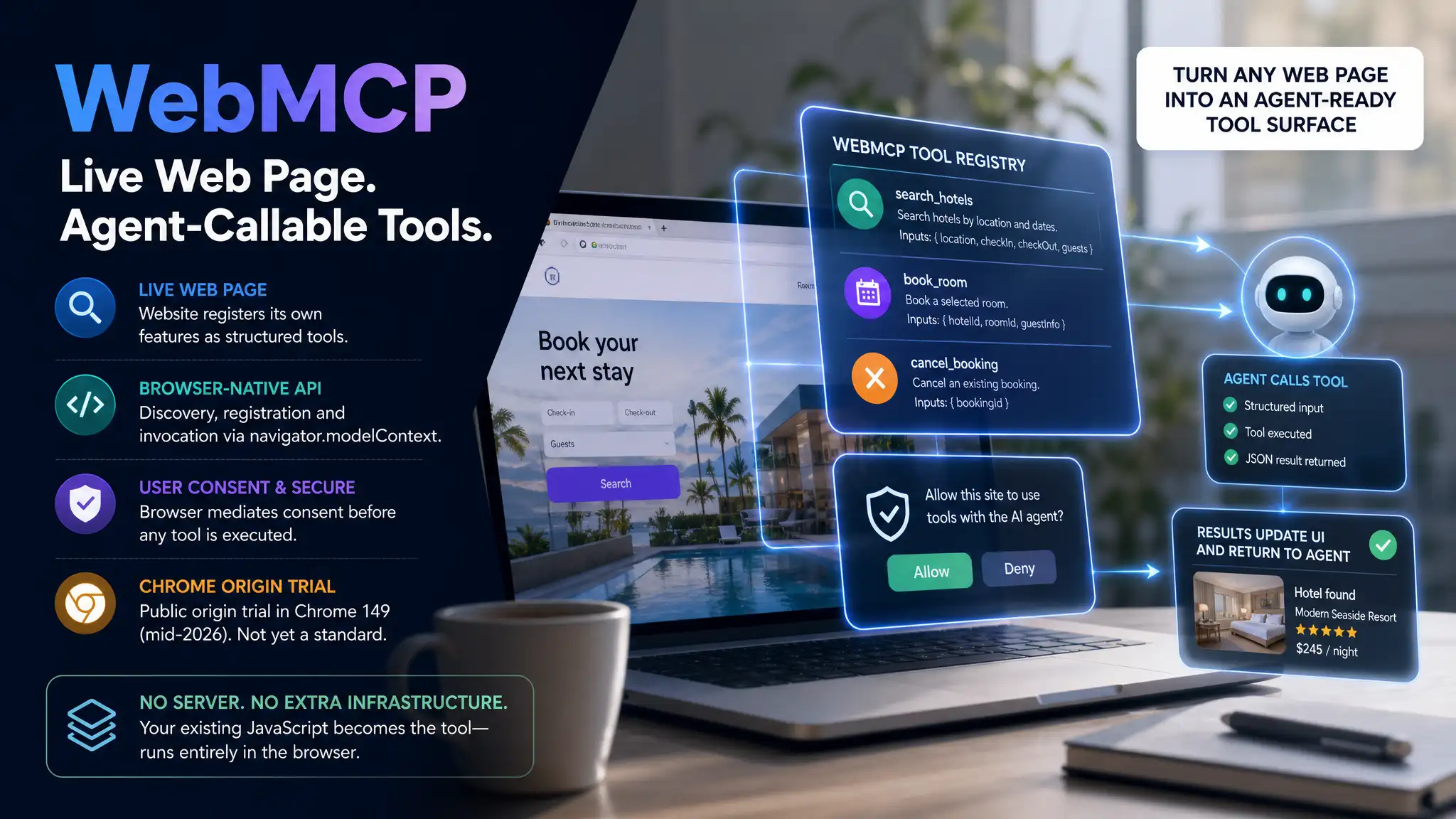
WebMCP is a W3C browser API, co-developed by Google and Microsoft engineers, that lets a website register its own features as structured, callable tools for AI agents running inside the browser. Discovery, registration and invocation all happen through browser-native mechanisms, not a separate server. As of mid-2026, it is in a public origin trial in Chrome 149 and remains a community group draft, not yet a W3C standard.
What WebMCP Actually Does
The problem WebMCP solves is specific: today, a browser-based AI agent that wants to take an action on a page has to infer the interface, screenshot the DOM, or reverse-engineer the UI. WebMCP inverts that. A site author registers structured functions, each with a name, a natural-language description, and an input schema, that an agent can discover through the browser's navigator.modelContext API and call directly.
The practical result is that your existing client-side JavaScript becomes the tool. There is no Python or Node.js server to deploy. There is no separate service to keep alive. The browser handles communication between the page and the agent.
The conceptual frame that helps most: WebMCP makes a web page behave like a Model Context Protocol server, but scoped to a single browser tab and running entirely through browser-native mechanisms rather than a network wire protocol.
How WebMCP Fits into the Broader Agent Stack
WebMCP did not appear in isolation. Google unveiled WebMCP at I/O 2026, a proposed W3C standard co-developed with Microsoft that addresses a gap the base MCP protocol leaves open.
Classic MCP, which Anthropic donated to the newly formed Agentic AI Foundation under the Linux Foundation in December 2025, ensuring vendor-neutral governance, connects a model to tools over a network transport. That works well for server-side resources: databases, APIs, file systems. It does not address the specific problem of an agent operating inside a live web page.
WebMCP is a W3C Web Machine Learning Community Group draft. Its three editors are Brandon Walderman (Microsoft), Khushal Sagar (Google), and Dominic Farolino (Google). The Intent to Experiment for Chromium was filed in April 2026; the public announcement was at Google I/O 2026.
The three-layer picture that emerges: MCP handles general tool access for agents, agent-to-agent protocols handle coordination between systems, and WebMCP handles the specific problem of an agent operating inside a live web page the user already has open. They are complementary, not competing.
Registering a Tool: The Imperative API
The imperative API uses JavaScript to register tools using document.modelContext.registerTool. Every registered tool needs three components, and the combination of all three is what lets an agent use it correctly without ever reading your source code.
- Name
- A clear, action-oriented identifier (e.g.
book_appointment,search_products) - Description
- Natural-language explanation of what the tool does and when an agent should use it
- Input schema
- Declared parameter types the agent uses to call the tool correctly
- Execute handler
- The JavaScript function that runs when the tool is invoked
Use clear, action-oriented names. Provide detailed descriptions that explain what the tool does and when an agent should use it. The execute handler is where your existing logic lives: a search routine, a booking function, a cart action. When invoked, it runs that logic and returns results as structured JSON, which flows back through the browser to the agent while your visual interface updates in parallel.
Return clean, structured data rather than HTML fragments. The agent reasons over the JSON, not the rendered markup, and a schema that leaks presentation concerns breaks the abstraction.
💡 Design principle: Mirror each registered tool to one concrete user action your UI already supports (search, add-to-cart, book a slot) so the agent's call and the on-screen result stay in sync and the tool schema stays small and testable.
Consent, Security, and the Trust Model
WebMCP runs inside the browser's trust model, not around it. The browser mediates a consent step before any tool is invoked. Only after the user grants consent does the browser call the tool's execute handler on the page.
That architecture has direct implications for how you build. Treat every tool as a permissioned capability. Validate inputs inside the execute handler exactly as you would for any public API; the schema alone is not sufficient validation. Avoid exposing destructive or irreversible actions as low-friction tools without an explicit confirmation step in the handler.
As of mid-2026, WebMCP is in a public origin trial in Chrome 149. It is not yet a W3C standard and is not on the formal W3C Standards Track. That status means browser support is uneven. Build defensively: feature-detect navigator.modelContext before registering anything, and fall back gracefully to your standard UI when the API is absent. The consent-and-invocation round trip in Chrome's implementation is the test that matters before widening the set of tools you expose.
The Relationship between WebMCP and AISEO
For sites built as agentic infrastructure, WebMCP represents a specific point of leverage. A page that registers tools with precise schemas gives browser-based agents a reliable, structured interface, rather than leaving them to guess at a DOM. That is the same principle that underlies structured data for AI answer engines: legibility to machines is a prerequisite for being usable by them.
The implication for site architecture is that WebMCP and AISEO work on adjacent surfaces. AISEO shapes how AI answer engines cite and summarize a site's content; WebMCP shapes how browser-based agents act on the site's capabilities. Both require intentional, declarative design choices made at the architecture level, not added as afterthoughts.